I’ve been working with both platforms long enough to have real opinions about them. Not the kind you get from a 20-minute trial, but from actually setting these tools up for clients, migrating data between them, and watching where things break.
If you’re comparing Xero vs QuickBooks Online in 2026 — on pricing, payroll, ease of use, or support — this guide covers all of it. I’ll tell you what each platform does well, where each one falls short, and which one actually makes sense for your situation.
The short answer: both are solid. Picking the wrong one for your setup is still easy to do.
Pricing note: All prices verified as of March 2026. Both platforms change pricing regularly — always confirm on the official site before subscribing.
Why Trust This Comparison
I’m a Xero-certified advisor and have been working hands-on with both Xero and QuickBooks Online for years across dozens of client businesses — solo freelancers, ecommerce stores, service businesses, and small retail shops.
I’ve set up both platforms from scratch, migrated businesses from QuickBooks to Xero, and troubleshot real issues that don’t show up in any documentation. I run the affiliate site eCom Builder Insider and cover accounting software full-time.
This isn’t a spec sheet comparison. It’s based on what I’ve seen actually happen when real businesses use these tools.
1. Quick Comparison
| Feature | Xero | QuickBooks Online |
|---|---|---|
| Starting Price | $25/month | $38/month |
| Free Trial | 30 days | 30 days |
| Unlimited Users | ✅ All plans | ❌ Plan-dependent (1–25) |
| Integrations | 1,000+ apps | 750+ apps |
| Ease of Use | Very easy | Moderate |
| US Payroll | Via Gusto (extra cost) | Built-in (some plans) |
| Multi-Currency | Established plan | Advanced plan |
| Phone Support | ❌ No | ✅ Yes (most plans) |
| Inventory Management | Basic | Advanced (Plus/Advanced) |
| Best For | Teams, global businesses | US-focused, payroll-heavy |
2. Pricing — What You Actually Pay

Xero Pricing (US, March 2026)
| Plan | Price/Month | Users | Key Limits |
|---|---|---|---|
| Early | $25 | Unlimited | 20 invoices, 5 bills/month |
| Growing | $55 | Unlimited | Unlimited invoices and bills |
| Established | $90 | Unlimited | Everything + multi-currency, expenses, projects |
Xero frequently runs discounts for new subscribers — typically 50–90% off for the first 3–6 months depending on the time of year and your region. Check the latest verified Xero discount here →
Extra costs to factor in:
- Gusto payroll (US only): from $40/month + $6/person
- Analytics Plus: included in Established plan only
QuickBooks Online Pricing (US, March 2026)
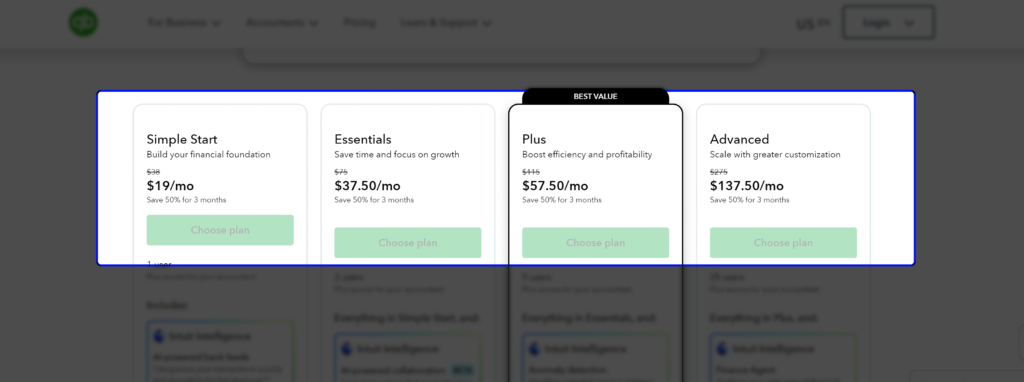
| Plan | Price/Month | Users | Key Features |
|---|---|---|---|
| Solopreneur | $20 | 1 | Self-employed basics only |
| Simple Start | $38 | 1 | Core accounting, invoicing |
| Essentials | $75 | 3 | Bill management, time tracking |
| Plus | $115 | 5 | Inventory, project tracking |
| Advanced | $275 | 25 | Full suite, advanced reporting |
New customers can usually get 50% off for the first 3 months. Check quickbooks.intuit.com for the current offer.
Extra costs to factor in:
- Payroll: from $50/month base + $6.50/employee
- QuickBooks Live bookkeeping: extra monthly cost
What the pricing gap actually means
Xero’s unlimited users policy is the thing that changes the math for small teams. If you have a business owner, a bookkeeper, and an accountant who all need access — Xero covers all of them at no extra cost on any plan. On QuickBooks, you need Essentials ($75/month) for 3 users, or Plus ($115/month) for 5.
That said, if you’re a solo US-based business owner who needs payroll, QuickBooks can end up cheaper once you add Xero’s Gusto cost on top.
Neither platform is cheap once you add what you actually need. Work out your full cost — base plan plus add-ons — before deciding.
For a deeper breakdown, see my Xero pricing guide → and Xero review →.
3. Ease of Use
Xero wins this, and it’s not close.
The dashboard makes sense immediately. Sending an invoice, reconciling a transaction, pulling a report — none of it requires digging through menus. I’ve given Xero access to clients who’d never touched accounting software before. Most of them find their way around within a week without needing help.
QuickBooks Online has a steeper learning curve, especially if you’re on Plus or Advanced. There’s more power in there, but also more menus and more places to get lost. That depth eventually pays off for businesses with complex needs. For the average small business owner, it’s more than they signed up for.
Ratings on GetApp put Xero at 4.2/5 for ease of use and QuickBooks at 4.1/5. The gap is small on paper. It feels bigger when you’re actually using them every day.
4. Invoicing
Both handle invoicing well. A few differences worth knowing.
Xero lets you create a clean invoice in a few clicks — add your logo, set a due date, send it directly from the platform. Recurring invoices and automatic payment reminders are built in. Payments come in via Stripe, PayPal, and GoCardless. The one catch: the Early plan caps you at 20 invoices per month. Most growing businesses hit that ceiling faster than they expect.
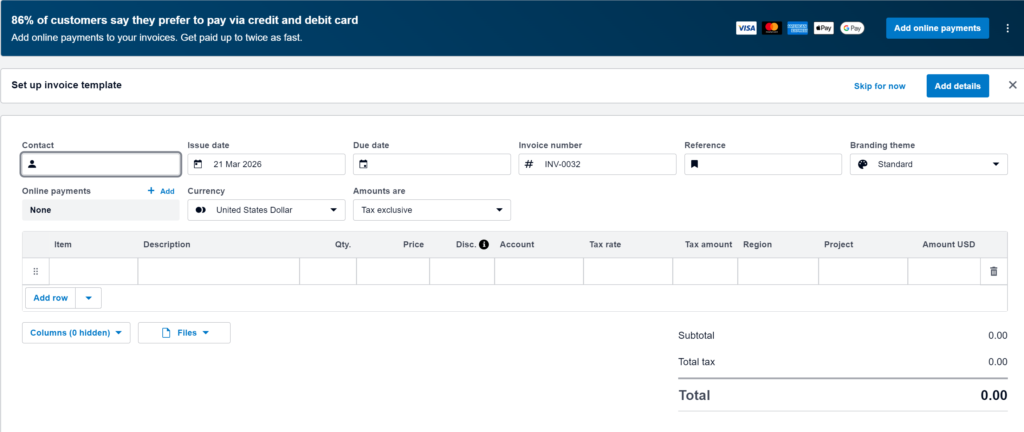
QuickBooks Online has no invoice limits even on Simple Start. One thing QBO does better: you can update client details directly inside the invoice without navigating away. Small thing, but it saves time if you’re editing on the fly. The Advanced plan also has batch invoicing if you’re billing dozens of clients at once.
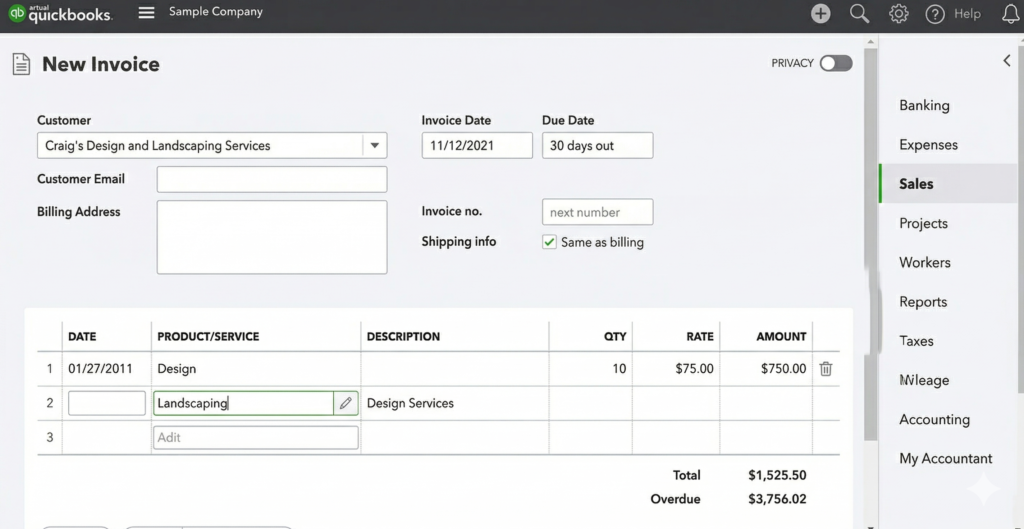
For most small businesses, there’s no real difference here. Both get the job done.
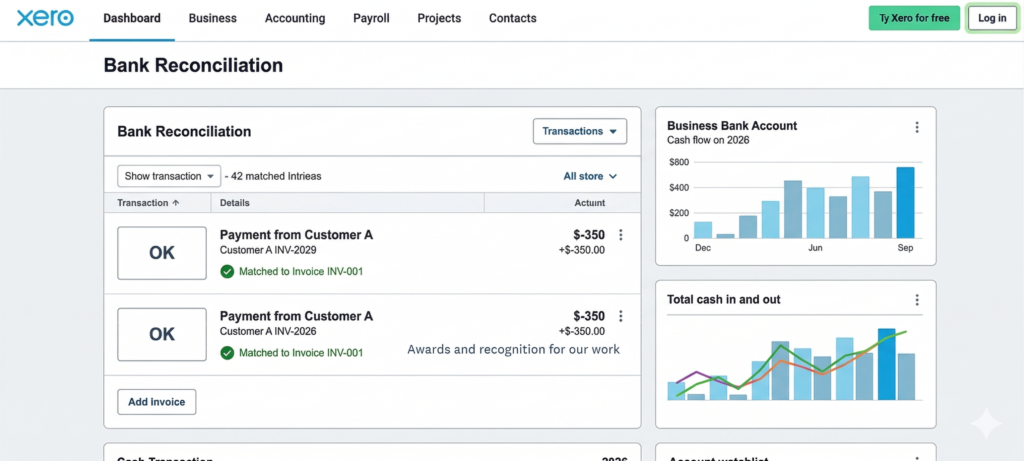
5. Bank Reconciliation
This is where Xero is at its best.
Connect your bank — Xero links to over 21,000 financial institutions globally — and it imports transactions daily. It then suggests matches to your invoices and expenses. Over time the matching improves as it learns your patterns.
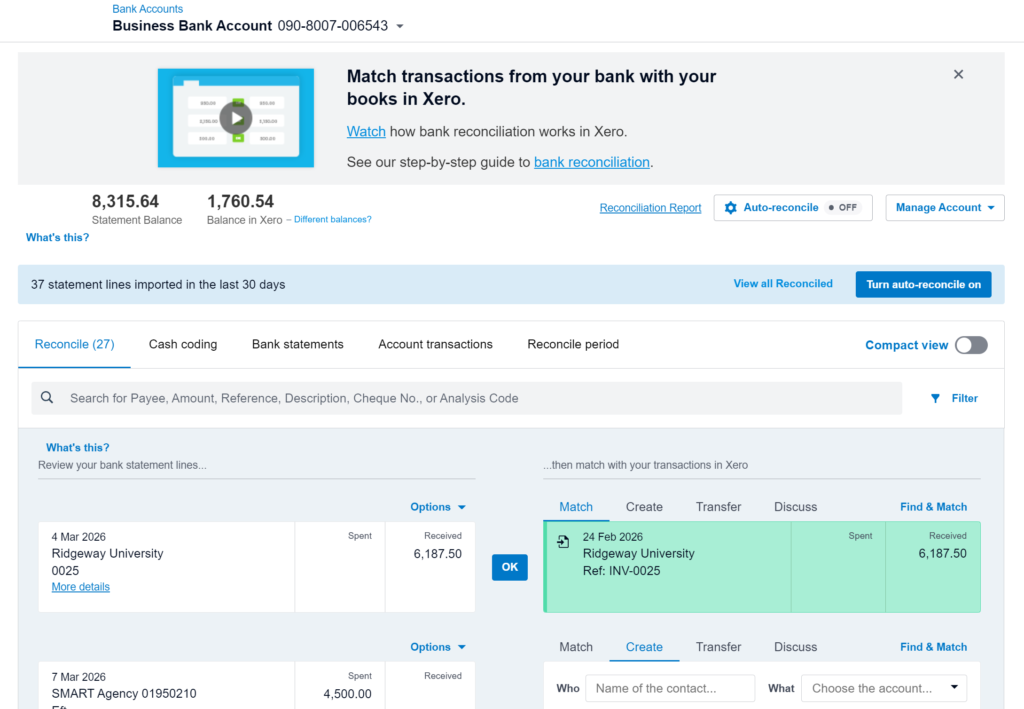
I’ve seen clients go from 2 hours of weekly reconciliation down to around 20 minutes after switching to Xero. That’s not a spec sheet stat — that’s real time saved every single week.
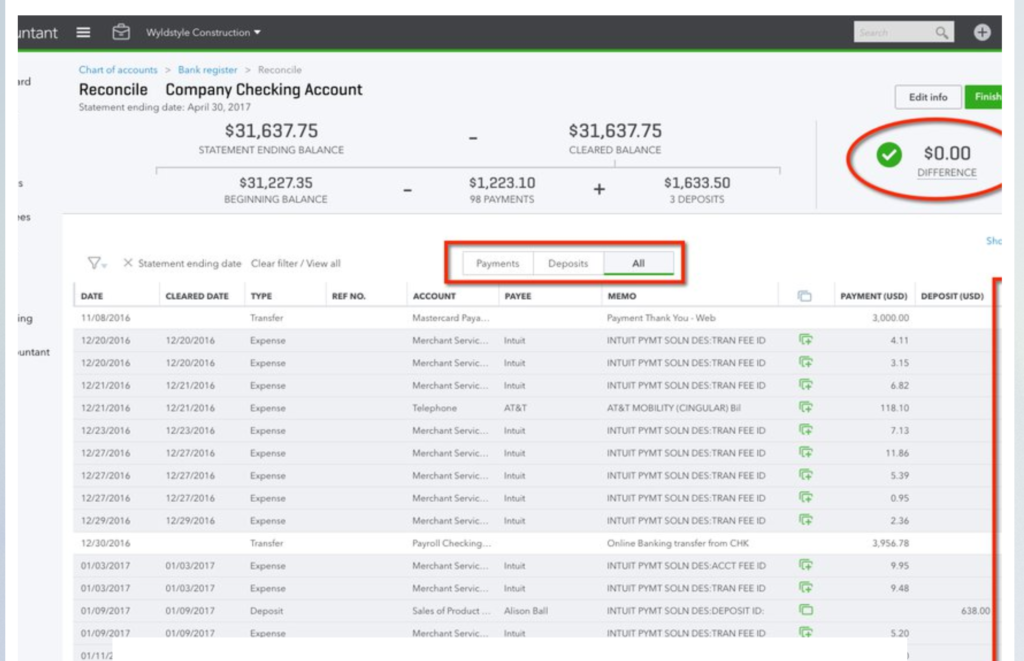
QuickBooks also has strong reconciliation and connects to a large number of US banks. Its matching is accurate for US-focused businesses. Xero’s global coverage gives it an edge if you’re working with international accounts.
6. Payroll
QuickBooks wins this one for US businesses. No argument.
Built-in payroll is available on most QBO plans. You handle pay, deductions, and payroll tax filing without leaving the platform. The add-on starts at $50/month base + $6.50 per employee. Not cheap, but it’s all in one place.
Xero dropped its native US payroll. US customers now use Gusto — a solid platform, but a separate subscription that starts at $40/month + $6/person. The integration works fine. It’s still another login, another bill, and another thing that can break at the wrong time.
One exception: if you’re in Australia, UK, or New Zealand, Xero has payroll built in directly. That changes the comparison entirely.
7. Reporting
QuickBooks has more reporting depth, especially on higher plans.
QBO includes 65+ reports across most plans. The Advanced plan bundles a Fathom analytics subscription — worth around $468/year standalone — for detailed financial analysis. Reports are highly customizable by class, location, and department.
Xero covers the essentials cleanly — Profit & Loss, Balance Sheet, Cash Flow, Aged Receivables and Payables, Budget vs Actual. The reports update in real time and are easy to read. But if you need custom reporting without paying extra, QuickBooks gives you more out of the box.
For a freelancer or small service business, Xero’s reporting is more than enough. For a product business with multiple locations or departments, QuickBooks’ depth is worth the higher price.
8. Integrations
Xero has 1,000+ apps in its App Store. QuickBooks connects to 750+.
Xero’s ecosystem covers most things you’d need — Gusto for payroll, Shopify and A2X for ecommerce, HubSpot for CRM, Hubdoc and Dext for receipts. The open API makes it a natural fit for tech-forward businesses that want to connect custom tools.
QuickBooks has fewer integrations but goes deeper on US-specific products — its own payroll, payments, and live bookkeeping services. If you’re already inside the Intuit ecosystem, those connections feel native.
Both support Zapier and open API access. Either platform can technically connect to almost anything.
9. Customer Support
This is Xero’s biggest weakness, and I’m not going to soften it.
No standard phone support. Everything goes through email and Xero Central, their help center. When something breaks before a deadline — a billing error, a bank feed that stops working — waiting 24–48 hours for an email reply is genuinely painful. It’s the most consistent complaint you’ll see from real Xero users on Reddit and Trustpilot.
QuickBooks offers phone and chat support Monday through Saturday on most plans, and 24/7 support on Advanced. Neither company is known for fast, helpful responses, but at least with QuickBooks you can reach a person.
If support availability matters to your team, this is a real difference.
10. Mobile App
Both are usable. QuickBooks is more capable.
Xero mobile covers invoicing, receipt scanning, cash flow checks, and expense approvals. Clean and reliable for day-to-day use. Doesn’t match the desktop version feature-for-feature, but handles what most people need on the go.
QuickBooks mobile is more complete — receipt capture, mileage tracking, time tracking, and detailed reports are all there. If you manage most of your business from a phone, QuickBooks’ app gives you more to work with.
For most people either works fine. If mobile is where you spend most of your time, lean QuickBooks.
11. Security
Both are solid. No meaningful gap for most businesses.
Xero: SOC 2 compliant, ISO 27001 certified, two-factor authentication, role-based access, full audit trail.
QuickBooks Online: PCI DSS compliant for payments, SOC reports, ISO/IEC 27001 certified, 2FA, and user permissions.
Either platform is appropriate for handling business financial data.
12. Who Should Choose Xero?
Xero is the better fit if you:
- Have a team and don’t want to pay per user
- Work with international clients and need multi-currency support
- Want software that’s easy to hand off to a non-accountant
- Are based in Australia, UK, or New Zealand (built-in payroll)
- Already use Shopify, A2X, HubSpot, or other Xero-native tools
- Work with an accountant who uses Xero
See my full Xero review → | Latest Xero discount →
13. Who Should Choose QuickBooks Online?
QuickBooks Online is the better fit if you:
- Are US-based and need payroll built into your accounting platform
- Need to get someone on the phone when something goes wrong
- Have serious inventory management needs
- Want detailed custom reporting without paying for add-ons
- Already use QuickBooks Payments or QuickBooks Time
- Your accountant specifically works in QBO — this matters more than most people think
14. Final Verdict
No clean winner. They’re both good tools built for different situations.
If I had to put it in one sentence: Xero is better for teams and businesses with international clients. QuickBooks Online is better for US-focused businesses that need payroll and want phone support.
For most small US businesses, it comes down to one question: do you need payroll? If yes, QuickBooks saves you the extra Gusto cost. If no — or if you’re outside the US — Xero is usually easier to use, better value for teams, and more than capable for everything else.
Both have 30-day free trials. Test them for real — connect your bank, send an invoice, run a report. You’ll have a clear answer within a few days.
If Xero looks like the right fit, there’s a limited-time discount for new subscribers right now. Check the current Xero offer here →
Pricing and features change regularly. Always verify current details at xero.com and quickbooks.intuit.com before subscribing.
Video Guide
15. FAQs
Is Xero cheaper than QuickBooks Online?
At the entry level, Xero starts at $25/month vs QuickBooks Simple Start at $38/month. For teams, Xero often ends up cheaper because unlimited users are included on every plan. For a solo US business owner who needs payroll, QuickBooks can work out cheaper once you factor in Xero’s Gusto add-on.
Does Xero have payroll in the US?
No native payroll. US customers use Gusto, a separate integration starting at $40/month + $6/person. In Australia, UK, and New Zealand, payroll is built directly into Xero.
Which is easier to use — Xero or QuickBooks?
Xero. It’s faster to get comfortable with, especially for non-accountants. QuickBooks has more features on higher plans but takes longer to learn.
Can I switch from QuickBooks to Xero?
Yes. Xero has a migration process and onboarding support for US customers. The transition takes some setup time but is straightforward. Most of my clients who’ve made the switch say it was worth the effort.
Which has better customer support?
QuickBooks, clearly. Phone and chat support is available most days on most plans. Xero is email and help center only — no phone option.
Which is better for ecommerce?
Both connect well to Shopify. Xero + A2X is a popular setup for Amazon and Shopify sellers. QuickBooks Plus and Advanced have stronger native inventory tools if stock tracking is a priority.
Which platform do most accountants prefer?
In the US, QuickBooks has the larger accountant network. Internationally — particularly AU, UK, NZ — Xero is dominant. Ask your accountant before picking a platform. Their preference matters more than most people realize.